PCB Design with KiCad Part 4: Power symbols + net labels
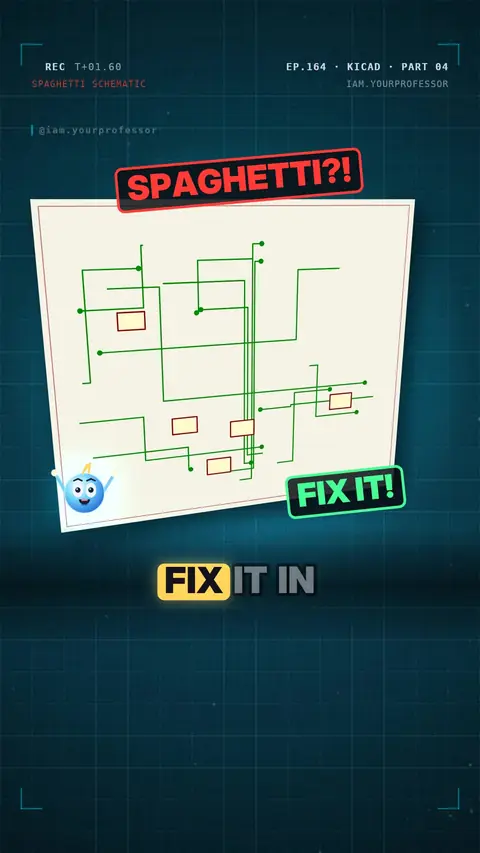
// WHAT YOU WILL LEARN
Two pins with the same label (or the same GND / +5V symbol) are connected, even with no wire drawn.
// LESSON NOTES
Your schematic looks like spaghetti? 🍝 Fix it in KiCad!
⌨️ Press P → power symbol: +5V on top, GND below.
⏚ Every GND symbol is the SAME wire — no lines needed!
⌨️ Press L → net label, and give it a name.
🔗 Two labels named LED? Yes, they're connected: same name = same wire.
Clean and easy to read ✅
Read the voiceover (transcript)
- Spaghetti schematic? Fix it in KiCad!
- Press P: five volts on top, ground below.
- Every ground symbol is one wire, no lines needed!
- Press L for a net label, and give it a name.
- Two labels named LED. Connected?
- Yes! Same name, same wire.
- Clean and easy to read!
- Next: ERC finds your mistakes. Follow for Part Five!
Related lessons
 EP.132 · PCB Design with KiCad · 2PCB Design with KiCad Part 2: Why KiCad?
 EP.107 · PCB Design with KiCad · 1PCB Design with KiCad Part 1: What is a PCB?
 EP.162 · Sensors · 4Sensors Part 4: How a Tesla sees the road (in India) — follower request @_adarshjaat007
 EP.159 · Embedded C · 7Embedded C Part 7: LED ON with 2 lines of registers
// NEWSLETTER · FREE
Get new lessons + early access to the full course
One email when new lessons drop. No spam, unsubscribe any time.
✓ You're on the list! We'll email you when new lessons drop.
By joining you agree to the privacy policy.