Microcontrollers L08: Raspberry Pi Pico (RP2040)
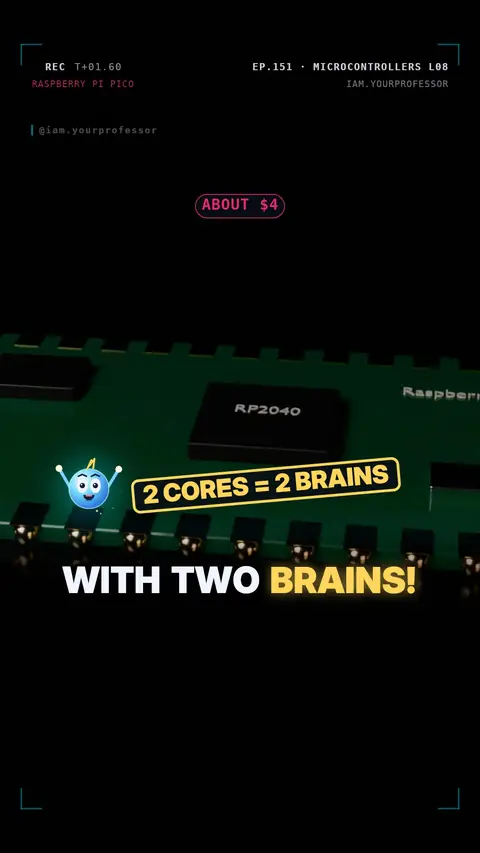
A $4 board with a dual-core 133 MHz RP2040 and 264 KB RAM; hold BOOTSEL + USB to load MicroPython, pins are 3.3 V.
A $4 board with TWO brains! 🍓🧠🧠
Meet the Raspberry Pi Pico and its RP2040 chip:
⚡ 2 cores at 133 MHz (an Arduino Uno: 1 core at 16 MHz)
🧠 264 KB of RAM (the Uno: 2 KB)
🔌 26 GPIO pins — 3.3 V only, never 5 V!
Getting started:
1️⃣ Hold BOOTSEL and plug in USB → it opens like a pen drive (RPI-RP2)
2️⃣ Drag the MicroPython file onto it
3️⃣ Six lines and the LED blinks:
from machine import Pin
import time
led = Pin(25, Pin.OUT)
while True:
led.toggle()
time.sleep(0.5)
(Pico W: use Pin("LED"). You can also code it in C/C++ or the Arduino IDE.)
Read the voiceover (transcript)
- A four-dollar board with two brains!
- Meet the Raspberry Pi Pico: the RP2040!
- Two cores at one hundred thirty-three megahertz. The Uno: sixteen!
- RAM? Two hundred sixty-four kilobytes. The Uno has two!
- Hold BOOTSEL, plug in USB, and it opens like a pen drive!
- Write six lines of MicroPython, and the LED blinks!
- Next, Part nine: the STM32. Follow for Part nine!
Related lessons
Get new lessons + early access to the full course
One email when new lessons drop. No spam, unsubscribe any time.
✓ You're on the list! We'll email you when new lessons drop.
By joining you agree to the privacy policy.