// FREE MINI-COURSE · LED
LED Series
LED & Arduino from Zero — From what an LED is to controlling it with code, one 20-second lesson at a time.
11 of 12 lessons out · next: millis() vs delay(): blink without freezing
▶ Start lesson 1- 01
 What actually happens when you turn ON an LED?Voltage pushes current through the LED's P-N junction; electrons meeting holes release light.
EP.01 · 24 s
What actually happens when you turn ON an LED?Voltage pushes current through the LED's P-N junction; electrons meeting holes release light.
EP.01 · 24 s - 02
 Why does an LED burn without a resistor?Above ~2 V an LED's current shoots up; a resistor limits it: R = (5 V − 2 V) ÷ current.
EP.02 · 20 s
Why does an LED burn without a resistor?Above ~2 V an LED's current shoots up; a resistor limits it: R = (5 V − 2 V) ÷ current.
EP.02 · 20 s - 03
 5 lines of C++ → a real LED turns ONsetup() runs once, loop() runs forever; pinMode + digitalWrite(HIGH) puts 5 V on a pin.
EP.03 · 20 s
5 lines of C++ → a real LED turns ONsetup() runs once, loop() runs forever; pinMode + digitalWrite(HIGH) puts 5 V on a pin.
EP.03 · 20 s - 04
 Make it BLINKdelay() pauses the program; ON-wait-OFF-wait inside loop() makes a blink, and a smaller delay blinks faster.
EP.05 · 20 s
Make it BLINKdelay() pauses the program; ON-wait-OFF-wait inside loop() makes a blink, and a smaller delay blinks faster.
EP.05 · 20 s - 05
 Make it FADE (PWM)analogWrite(pin, 0–255) on a ~ pin switches very fast (PWM); a for loop raises brightness step by step.
EP.06 · 20 s
Make it FADE (PWM)analogWrite(pin, 0–255) on a ~ pin switches very fast (PWM); a for loop raises brightness step by step.
EP.06 · 20 s - 06
 Control it with a BUTTONINPUT_PULLUP keeps the pin HIGH until the button pulls it to GND (LOW); one if/else switches the LED.
EP.10 · 20 s
Control it with a BUTTONINPUT_PULLUP keeps the pin HIGH until the button pulls it to GND (LOW); one if/else switches the LED.
EP.10 · 20 s - 07
 Make it a TOGGLEOne press ON, next press OFF: remember a state in a variable and detect the press.
EP.11 · 20 s
Make it a TOGGLEOne press ON, next press OFF: remember a state in a variable and detect the press.
EP.11 · 20 s - 08
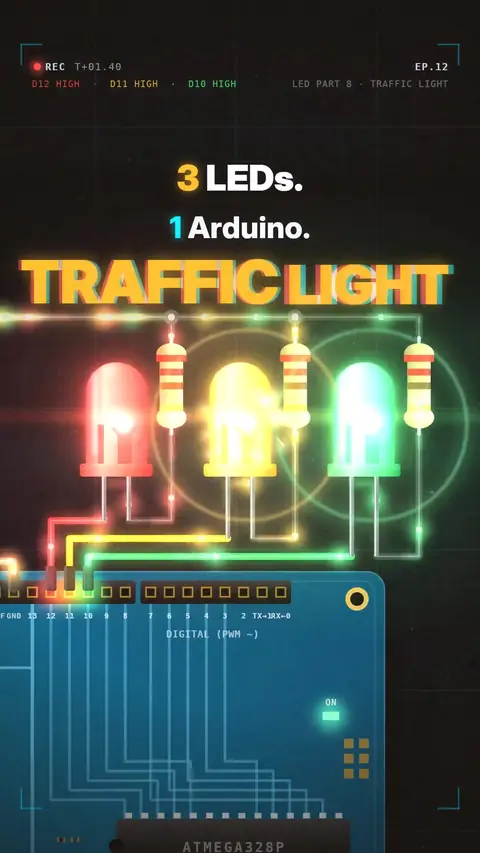 Traffic light with 3 LEDsThree LEDs on three pins, each with its own 220 Ω resistor: switch them ON → WAIT → OFF in turn to make a traffic light.
EP.12 · 20 s
Traffic light with 3 LEDsThree LEDs on three pins, each with its own 220 Ω resistor: switch them ON → WAIT → OFF in turn to make a traffic light.
EP.12 · 20 s - 09
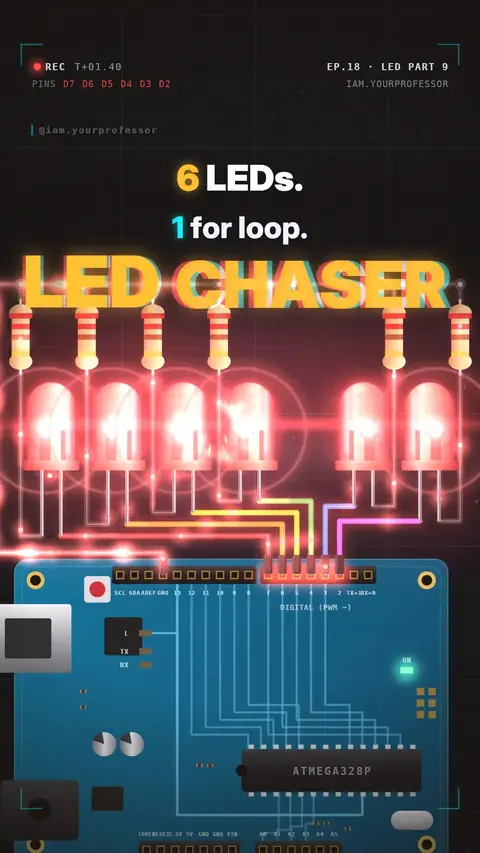 LED chaser (running light)Put 6 pins in an array (int leds[] = {7, 6, 5, 4, 3, 2}) and use one for loop so leds[i] lights each LED in turn; counting starts at 0.
EP.18 · 20 s
LED chaser (running light)Put 6 pins in an array (int leds[] = {7, 6, 5, 4, 3, 2}) and use one for loop so leds[i] lights each LED in turn; counting starts at 0.
EP.18 · 20 s - 10
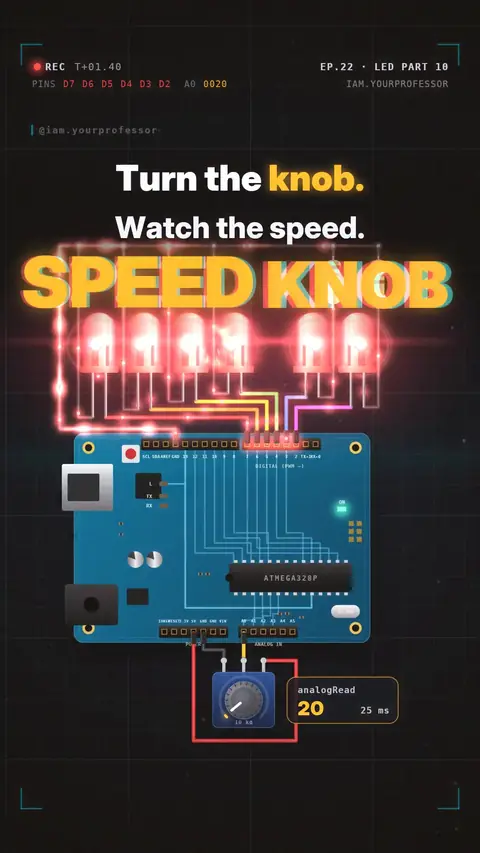 Speed knob: potentiometer + analogReadA potentiometer (5V, wiper → A0, GND) gives 0–5 V; analogRead(A0) turns it into 0–1023, and delay(knob / 4 + 20) makes the chaser 20–275 ms per LED.
EP.22 · 20 s
Speed knob: potentiometer + analogReadA potentiometer (5V, wiper → A0, GND) gives 0–5 V; analogRead(A0) turns it into 0–1023, and delay(knob / 4 + 20) makes the chaser 20–275 ms per LED.
EP.22 · 20 s - 11
 Serial.print: see your knob's numberSerial.begin + Serial.println(knob) prints the analogRead value to the Serial Monitor on your laptop.
EP.61 · 24 s
Serial.print: see your knob's numberSerial.begin + Serial.println(knob) prints the analogRead value to the Serial Monitor on your laptop.
EP.61 · 24 s - 12 COMING NEXTmillis() vs delay(): blink without freezingdelay() stops the whole program; millis() lets the LED blink while the code keeps reading the knob.
// NEWSLETTER · FREE
Get new lessons + early access to the full course
One email when new lessons drop. No spam, unsubscribe any time.
✓ You're on the list. Check your inbox to confirm.
By joining you agree to the privacy policy.