Why your motor needs a driver
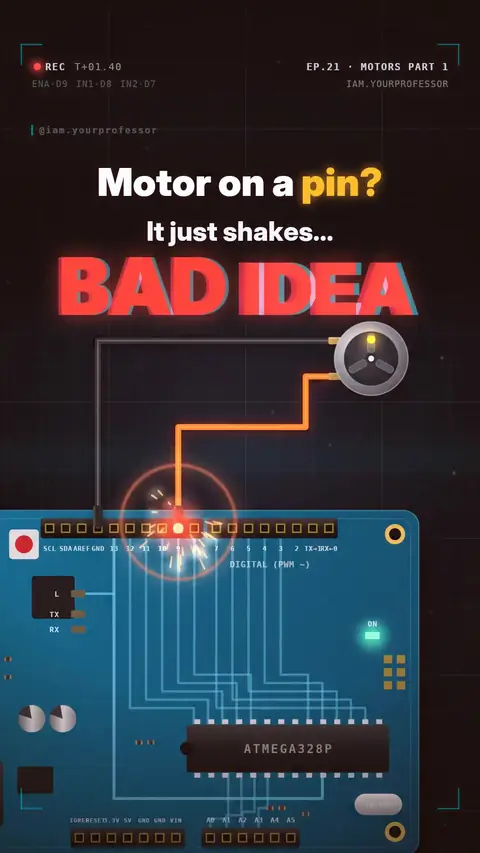
Why a pin can't power a motor, and how an L298N driver sets direction (IN1/IN2) and speed (PWM on ENA).
Never connect a motor straight to an Arduino pin ⚠️
A pin gives about 20 mA (40 mA is the absolute max). A small DC motor wants 500 mA or more. That's 25× more. The pin overheats and the motor just shakes.
THE FIX: a motor driver (like the L298N).
🧠 Arduino = brain: sends tiny signals
💪 Driver = muscle: takes power from a battery and pushes it into the motor
WIRING: ENA → pin 9, IN1 → pin 8, IN2 → pin 7, motor on OUT1/OUT2, 6 V battery on the driver, and join ALL the GNDs together.
DIRECTION: inside is an H-bridge, 4 switches. IN1 HIGH + IN2 LOW = forward. Swap them = reverse.
SPEED: analogWrite(ENA, 0–255) on a PWM pin. 255 = full, 0 = stop. (Remove the ENA jumper on the L298N.)
Related lessons
Get new lessons + early access to the full course
One email when new lessons drop. No spam, unsubscribe any time.
✓ You're on the list. Check your inbox to confirm.
By joining you agree to the privacy policy.